|
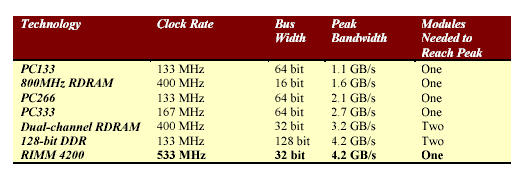
DDR SDRAM and Rambus RAM Until motherboards with chipsets able to use the new DDR RAM, Intel Pentium 4 processors could only use Rambus RAM, which runs at an effective speed of 400MHz, and is comparatively still very expensive compared to standard PC 100 and PC 133 SDRAM, and PC 1600 and PC 2100 DDR RAM. - See below for the news that has just come out that VIA has developed a chipset that supports DDR SDRAM. AMD Athlon processors can run on motherboards that use PC 1600 and PC 2100 DDR RAM. AMD Duron processors run on a 100MHz system bus that can only use the PC 1600 DDR RAM. PC 2100 DDR RAM runs on a 133MHz system bus. - More on this further down the article. Below is a table that provides some interesting information about the differences between recent types of RAM technologie You can use some of the easy tools to find your exact DDR or DDR2 Memory Upgrades for your Desktop, Laptop or Servers.
DDR Memory Upgrades | DDR2 Memory Upgrades DDR Memory RAM
DDR2 Memory RAM
| What is DDR Memory? |
Why Use DDR Technology?
| DDR
Memory at A Glance | Memory
Upgrade Websites |
|
|||||||||||||||||||||||||||||||||||||||||||||||||||||||||||||||||||||||||||||||||||||||||||||||||||||||||||||||||||||||||||||||||||||||||||||||||||||||||||||||||||||||||||||||||||||||||||||||||||||||||||||||||||||||||||||||||||||||||||||||||||||||||||||||||||||
|
|
|||||||||||||||||||||||||||||||||||||||||||||||||||||||||||||||||||||||||||||||||||||||||||||||||||||||||||||||||||||||||||||||||||||||||||||||||||||||||||||||||||||||||||||||||||||||||||||||||||||||||||||||||||||||||||||||||||||||||||||||||||||||||||||||||||||

 High-Speed Best Price DDR3 Memory Upgrades